

Discovered – currently not indexed means Google knows a URL exists but has not crawled it yet. Google Search Console does not tell you from this label alone whether the delay comes from one page, the site’s crawl conditions, or the wider set of URLs Google knows about.
Google’s official Page indexing documentation adds useful context: typically, Google wanted to crawl the URL but rescheduled the crawl because doing so was expected to overload the site. That is an explanation of the reported state, not proof that your server is currently overloaded.
So the useful question is not simply, ‘How do I force Google to crawl this page?’ First check whether the URL belongs in the crawlable inventory, how Google can reach it, whether the site presents it consistently, and whether the same pattern affects other important URLs. If those checks are clean, waiting can be a perfectly sensible next step.
For a site-level overview of all indexing states, use MOCOBIN’s Page Indexing report guide. This page concentrates on one narrower problem: what to investigate before deciding that a discovered URL simply needs more time.

What the Status Actually Confirms

The status confirms two things: Google has discovered the URL, and Google has not yet crawled it. Search Console therefore normally shows no last crawl date for this state.
It helps to keep discovery, crawling and indexing separate:
- Discovery: Google learns that a URL exists through sources such as crawlable links or a sitemap.
- Crawling: a Google crawler requests the URL and retrieves a response.
- Indexing: after crawling, Google processes the page and determines whether and how it belongs in the search index.
A Discovered URL has reached the first stage but has not yet reached the second. That makes body-copy rewrites, title changes and canonical analysis poor first assumptions. Google has not fetched the page in the state being reported.
Discovered and Crawled Need Different Investigations
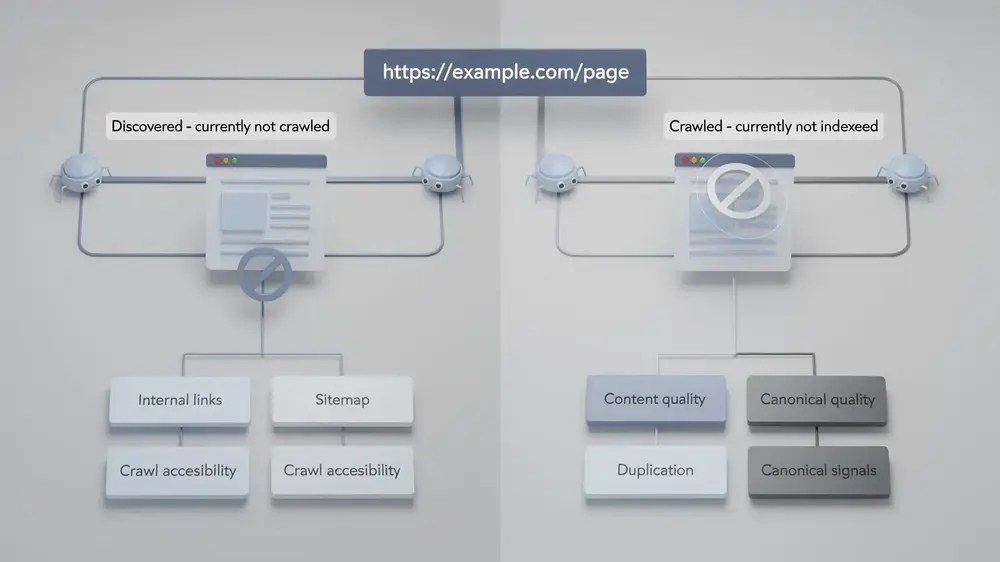
| Status | What Google confirms | Useful first question |
|---|---|---|
| Discovered – currently not indexed | Google knows the URL but has not crawled it yet. | How is the URL being discovered, and do the site’s crawl conditions support reaching it? |
| Crawled – currently not indexed | Google has crawled the URL but has not indexed it. | Does the page deserve a separate search role, and do canonical, content and site signals support it? |
If Search Console later moves the URL into the second state, switch diagnostic paths. MOCOBIN’s guide to Crawled – currently not indexed covers that post-crawl investigation.
Do Not Turn Every Delayed Crawl Into a Crawl-Budget Problem

Crawl budget is real, but it is an advanced site-level concept rather than the automatic explanation for one waiting URL. Google’s current crawl-budget documentation is aimed primarily at very large sites, rapidly changing medium-to-large sites, and sites where a large proportion of known URLs remain Discovered – currently not indexed. Google also says the size figures in that guide are rough classifications, not exact thresholds.
For one important new page on an otherwise healthy site, start with the page’s discovery path and accessibility. Escalate to crawl-budget analysis when the number and pattern of affected URLs justify it.
Calling every delayed crawl a crawl-budget problem makes the diagnosis sound more precise than the evidence allows.
Decide Whether the URL Belongs in the Crawlable Inventory

Before trying to increase crawl activity, check whether the URL is one the site genuinely wants Google to spend time fetching. Modern CMSs can create many URLs that are useful technically or for users but do not need a separate search-facing role.
A useful crawlable inventory is not the largest possible set of URLs. It is the set the site can defend as intentional destinations.
URLs Worth Investigating

A new article with a distinct search purpose, a core service page, an important category, a product page intended for organic search, or a genuine supporting cluster page all merit investigation when Google repeatedly knows about them but does not crawl them.
The useful test is whether the page has a clear job in the site. A supporting article, for example, should answer a question that its pillar does not answer in full and should have a natural route from relevant content. If that role is clear, an unexpected crawl delay is worth diagnosing.
URLs That May Not Need More Crawl Attention

Parameter combinations, internal search URLs, sort variants, duplicate archives, obsolete test pages and accidental URL variations may not deserve the same treatment. A large set of such URLs can also make the site’s perceived URL inventory considerably larger than the useful content set.
That does not mean every unwanted URL should be blocked in robots.txt. The correct treatment depends on why the URL exists. Duplicates may need consolidation or canonicalisation, permanently removed pages should normally return an appropriate error response, and some user-facing URL patterns may remain useful even when they are not search destinations.
The first job is therefore classification: separate URLs the site wants Google to crawl from URLs that exist as technical or navigational by-products.
Follow the Discovery Path Back Into the Site

Once the URL is confirmed as important, inspect how the site exposes it. This is more useful than changing several unrelated SEO elements at once.
Inspect the URL Before Editing It

Start with the URL Inspection tool. For a Discovered URL, note the indexing verdict, discovery information, sitemap information and referring page information where Search Console provides them.
A blank last crawl field fits this status because Google has not yet performed the crawl represented by the report. You can also run a Live Test to see whether Google-InspectionTool can fetch the current URL now. A successful Live Test is useful evidence of current accessibility, but it does not mean Google’s normal crawler has processed the page, and it does not guarantee indexing.
Check for a Real Crawlable Internal Link
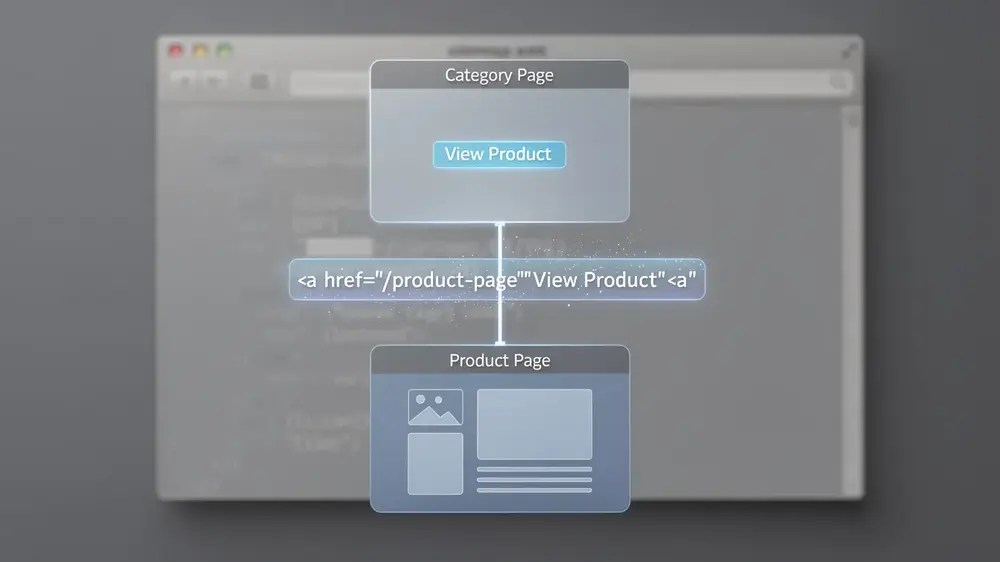
Google says it can reliably crawl links expressed as an HTML <a> element with an href attribute, and recommends that pages you care about receive a link from at least one other page on the site.
For an important URL, verify that a relevant page links to it through a normal crawlable link. A cluster article should usually have a contextual route from its hub or another closely related page. MOCOBIN’s internal linking guide covers how to make those connections without manufacturing arbitrary link counts.
The existence of a link does not guarantee an immediate crawl. Its value here is simpler: it gives Google a normal route to the URL and makes the page part of the site’s visible information structure.
Check Whether the Page Is Buried or Effectively Orphaned

A page can appear in an XML sitemap and still be poorly integrated into the normal site architecture. Compare the affected URL with similar important pages. Is it linked from the expected hub, category or related content? Can a user reach it through a sensible route, or does it depend on one obscure link?
Avoid turning this into a rigid click-depth formula. Google does not publish a rule that every important page must sit within a fixed number of clicks from the homepage. Relative depth is useful because it exposes anomalies: if comparable pages have clear routes and one page is isolated several layers away, the architecture deserves attention.
Check the XML Sitemap as a Discovery Signal

If the URL is intended for search, check whether it is represented correctly in the relevant XML sitemap. Google recommends listing the canonical URLs you want considered for Search and using an accurate lastmod when that field is supplied.
MOCOBIN’s guide to HTML and XML sitemaps explains the distinction between sitemap discovery and normal site navigation. Google’s own sitemap documentation is explicit that submission is a hint: it does not guarantee that Google will download the sitemap, crawl every listed URL or index those URLs.
A sitemap can nominate a URL. It cannot schedule the crawl.
Make Sure the Site Exposes One Consistent URL

Check whether internal links, navigation and the XML sitemap all use the intended clean URL. Avoid sending crawlers through obsolete HTTP versions, redirect chains, accidental parameter URLs or inconsistent hostname and trailing-slash variants when the site has already chosen a preferred version.
Tracking parameters deserve attention at their source. Editorial internal links should point directly to the clean destination rather than creating UTM-tagged crawl paths. If a large site exposes whole classes of unwanted crawlable URLs, handle the relevant URL-generation rule rather than relying on a retired Search Console parameter tool or adding ad hoc directives page by page.
Escalate to Site-Level Crawl Diagnosis Only When the Pattern Justifies It

One waiting URL and an entire page type stuck in the same state are not the same problem. Once the page-level discovery checks are complete, examine scale.
Group Similar Affected URLs Before Changing Them

Group affected URLs by something that could explain shared behaviour: template, category, publishing period, language section, CMS source, sitemap, URL pattern or internal-link structure.
If all pages from one recently introduced template remain Discovered while comparable pages elsewhere are crawled normally, investigate what the template or publishing workflow has in common. If only one page is affected, a site-wide crawl project may be disproportionate.
The point is to form a testable pattern before changing a large group. There is no fixed sample size that proves a diagnosis.
Use Crawl Stats to Check Host and Crawl Conditions

For a broader pattern, the Crawl Stats report can show total crawl requests, response codes, average response time, host status and crawl purpose. Google’s documentation describes this as an advanced report and says sites with fewer than about a thousand pages should not normally need this level of crawl analysis.
Do not treat total crawl requests as a score. A rise can follow a legitimate release or reflect unnecessary URLs. A fall can be normal after URL clean-up or may coincide with an access problem. Look for changes that line up with the affected URL group and known site events.
Check Server Health With Evidence, Not Assumption

Host-status warnings, repeated 5xx responses, 429 rate limiting, DNS problems, robots.txt availability failures and sustained response-time degradation are relevant evidence because Google’s crawl capacity responds to server health.
But one Discovered URL does not establish any of those conditions. Confirm a server explanation through Crawl Stats, infrastructure monitoring or logs before treating it as the cause.
The Search Console label is a reason to check server health, not evidence that the server is unhealthy.
Check URL Inventory Before Trying to ‘Increase Crawl Budget’

Google describes crawl budget through two broad components: crawl capacity and crawl demand. One of the areas site owners can influence most is the perceived URL inventory.
Review large sources of unnecessary or duplicate URLs such as:
- faceted-navigation and sorting combinations;
- session or tracking variants exposed internally;
- duplicate taxonomy and archive URLs;
- internal search-result spaces;
- long redirect chains;
- soft 404 patterns;
- infinite or effectively unbounded URL spaces.
Cleaning such patterns can make crawling more efficient, but the relationship is not one-for-one. Google explicitly cautions that blocking some URLs does not mean the newly available crawl capacity will automatically be reassigned to the particular pages you prefer.
Decide Whether to Fix Something, Wait, or Escalate

After those checks, the appropriate response should be considerably clearer.
| What you find | What it suggests | Next step |
|---|---|---|
| One important new URL, useful internal link, correct sitemap treatment and no wider crawl problem | No obvious fault is visible. | Wait and monitor rather than changing the page repeatedly. |
| The page has no useful crawlable incoming internal link | The URL is poorly integrated into the site graph. | Add a relevant contextual route from an appropriate page. |
| The page is unusually isolated compared with similar pages | The architecture may be making it harder to reach. | Improve its structural placement rather than chasing a fixed click-depth number. |
| The preferred URL is missing from the appropriate sitemap | One useful discovery signal is absent. | Correct sitemap generation if the URL belongs there. |
| Sitemaps and internal links expose conflicting URL versions | The site is presenting an inconsistent URL inventory. | Align links, sitemap entries and redirects around the intended clean URL. |
| Many URLs from one template or site section share the status | The cause may be systemic. | Audit the shared template, architecture, publishing workflow and crawl data. |
| Crawl Stats and infrastructure data show host problems | Crawl capacity may be constrained. | Correct the server, DNS, robots.txt availability or rate-limiting problem. |
| The site exposes a very large unwanted URL space | Crawl resources may be spent on URLs the site does not value. | Fix the underlying URL-generation and duplicate-management rules. |
| The URL has no useful search-facing purpose | Crawling and indexing it may not be the goal. | Manage the URL according to its real user and technical purpose. |
Do Not Repeatedly Request Indexing

Google allows site owners to request a crawl for a limited number of URLs, but its current guidance says repeated requests for the same URL do not make it crawl any faster. A request also does not guarantee inclusion in Search.
Use Request Indexing when there is a specific reason to request a fresh crawl, not as a substitute for discovery paths, site architecture or healthy serving conditions.
Do Not Keep Submitting the Same Sitemap

If Search Console has already processed an unchanged sitemap, submitting the same file repeatedly does not fix a missing internal route, server problem or oversized URL inventory. Check the sitemap’s processing status, URL membership and accuracy instead.
The sitemap’s job is discovery. It is not a priority button.
Do Not Rewrite the Page Merely Because It Has Not Been Crawled

Google has not fetched the page content in the state described by this report. That makes a body-copy rewrite a poor first response to the status itself.
This does not mean site and content quality are irrelevant to crawl demand. Google’s crawl-budget documentation says Googlebot demand can reflect factors including overall page quality, relevance, popularity and change frequency. The distinction is narrower: the status does not prove that a particular paragraph, heading or word count caused Google not to crawl that individual URL.
Likewise, do not manufacture internal links from unrelated pages simply to increase a count. Links should create a genuine route for users and crawlers through related content.
Watch What Happens at the Next Stage
Record enough context to recognise whether the situation has actually changed: the URL, reported status, sitemap membership, known internal-link source, relevant page group, any crawl or server issue found, and the date of the change you made.
There is no guaranteed deadline for Google to crawl or index a URL. Google’s general recrawl guidance says crawling can take from a few days to a few weeks, but that is not a promise that every Discovered URL will move within a specific period. Use the surrounding evidence rather than an arbitrary seven-day or fourteen-day rule.
If the page is important, cleanly integrated into the site and the delay is isolated, waiting may be the correct next action. If the same status keeps appearing across an important URL group, investigate the shared system rather than pressing Request Indexing on each URL individually.
And if the URL eventually moves from Discovered – currently not indexed to Crawled – currently not indexed, the situation has changed rather than necessarily been solved. At that point, move to the post-crawl diagnostic workflow.


